Most people underestimate how many clothes they own, often by a lot. A closet inventory used to mean a weekend with a spreadsheet, but a digital closet can count brands, items and outfits for you. Here is how to take stock with Phia, and what the numbers are good for.

Closet Inventory App: How to Count Every Piece You Own
The number nobody knows
In 2010 Courtney Carver set herself a challenge she called Project 333: thirty-three items, including shoes, accessories and jewelry, for three months. It took off because it made people count, and counting turned out to be shocking. Most of us have no idea how many clothes we own.
Confession #1: when I first tried a closet inventory I guessed around one hundred and fifty pieces. I stopped counting at two hundred and still had the shoes to go. The gap between the number in your head and the number in your closet is where all the duplicates, forgotten pieces and never-worn tags live.
The old way to close that gap was a weekend, a spreadsheet and every item on the bed. It works, but nobody keeps the spreadsheet up to date, so it is out of date by the next delivery. What you want is an inventory that maintains itself.
Let your inbox do the counting
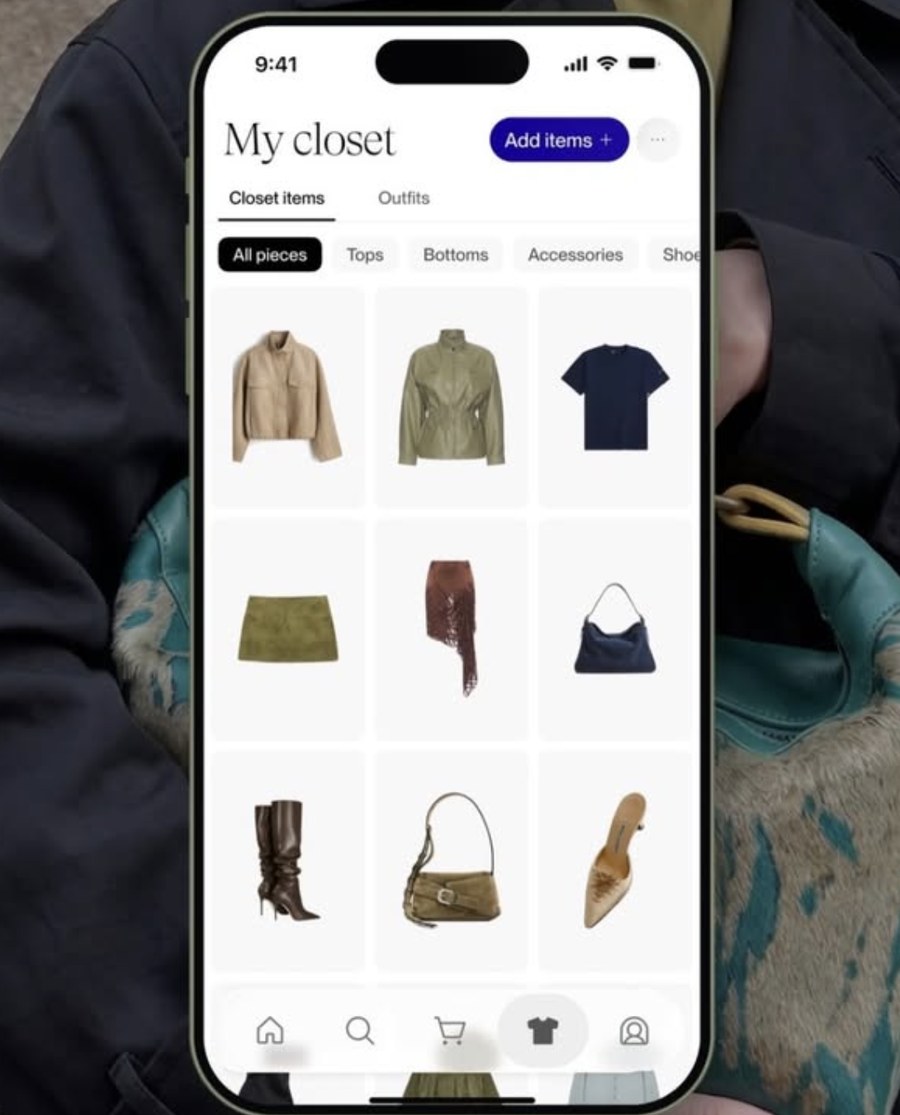
Most of what you own arrived with an email. Phia's Gmail sync reads retailer order confirmations, receipts and shipping emails and turns each purchase into a closet item, pulling the item name, brand, image, size, color, quantity, order number, merchant and order date. Each one gets its own clean photo, so the inventory looks like a wardrobe, not a ledger.
Phia now also has instant camera roll sync, which covers everything that did not come with an email. Phia AI finds the clothes, shoes and bags in the photos you have already taken and organizes them into your closet in seconds. It runs on your iPhone, no faces are uploaded, and every piece gets a cleaned-up photo to match the rest of the inventory. Anything you buy through the Phia extension lands in the closet at checkout, and for the vintage coat or a gift, you can add a piece yourself or search the web for it from inside the closet.
Because sync keeps running, the inventory stays current. New purchases appear without you doing anything, and if you return something, you remove it from the closet in a tap. That is the part a spreadsheet never managed. I go deeper on this in The Closet Apps That Import Clothes From Email Receipts.

Your numbers, at a glance
Once the closet fills, Phia's Style analysis tab shows the headline numbers: how many brands, how many items and how many outfits. Mine read sixty brands and three hundred items, which was humbling in the useful way. Underneath sit your top colors with percentages, your vibes and your top brands.
The counts make a closet inventory feel less like a chore and more like a portrait. Sixty brands tells you something about how loyal, or not, you are as a shopper. Your top brands tell you who you trust. And the gap between items and outfits tells you how much of your closet is actually being worn together.
A practical test: divide your item count by your outfit count. If you have three hundred items and twenty outfits saved, a lot of your wardrobe has never been styled, which usually means it is not being worn either. That is your shortlist for the next section.
Install Phia for free on iPhone, or add the Chrome extension.
Sort it into collections
A count is the start. The useful inventory is one you can slice. In Phia's Collections tab you can make a Category collection that groups pieces by style, season or occasion, like Workwear, Fall or Everyday Fits, and add any piece to more than one.
Phia also suggests collections from what you already own. Suggested for You offers ready-made groups like Spring, Night Out, Formal Gala and Professional Power, eight pieces each, and you can save one or tap Not for me. It is a quick way to see your inventory through a different lens, by occasion rather than category.
What I would skip: building a collection for every possible mood on day one. Start with the two or three you actually live in, usually work, weekend and going out. Then let the closet show you what does not fit into any of them. Those pieces are the honest answer to how many clothes you own but do not wear.
From inventory to outfits
An inventory is a list. The point of keeping one in an app is that the list can start working for you. Once your closet is counted, Phia uses it to build outfits, and you choose how involved you want to be. Tap Add outfit in the Outfits tab and Create an outfit offers four options: Style it yourself, Generate outfit, Style from one item, and Swipe through outfits, which is marked coming soon.
Generate outfit is Phia AI building complete looks from scratch. Style from one item starts from a single piece, which is the best use of a closet inventory, because it finds outfits for the things you counted and forgot. You also get outfits without asking. Phia generates suggestions from your closet and tags new ones in the Outfits tab, and the For you tab shows an Outfit of the day from Styled by Phia with the date, the forecast and a short recommendation, like a casual sweater and jeans. Next to it, Create look asks you to pick a piece you want to wear, and Phia builds the outfit.
A practical test: find the pieces in your inventory you have not worn in a season and run Style from one item on each. Every outfit Phia finds is one less reason to buy something new. What I would skip: waiting for a perfect count before you try outfits. Phia works with whatever is in the closet, and the suggestions get better as it fills.
Install Phia for free on iPhone, or add the Chrome extension.
What the count is for
The point of a closet inventory is not the number itself. It is what the number lets you stop doing. Once I knew I owned eleven white shirts, I stopped buying white shirts. Once I saw I had no proper navy coat, I bought one and wore it all winter.
Phia keeps the inventory beside the moment you shop. It compares prices across more than 220,000 sites, new and secondhand, and because the closet is in the same app, checking whether you already own something takes one tap.
To take your own inventory, download the free Phia app, connect Gmail and let it fill, then open Style analysis for the counts.